
I really wanted to use these cheap RF switches with Homeassistant. Unfortunately the rpi-rc library needs an integer number to know what to send for the switch to switch. I didn’t have an RF receiver so here’s a script that can convert between the 10 bit dip switch setting on the back of the plug and the integer needed for rpi-rc:
!/usr/bin/env python3
 import argparse
 def codify(code):
     return code.replace("0", "00").replace("1", "01")
 parser = argparse.ArgumentParser(description='Sends a decimal code via a 433/315MHz GPIO device')
 parser.add_argument('code', metavar='CODE', type=str,
                     help="zeroes and ones from the dip switch ('up'=1, 'down'=0)")
 args = parser.parse_args()
 code= args.code.replace('1','3').replace('0','1').replace('3','0')
 code_off= codify(code+'00')
 code_on= codify(code+'01')
 print("off: {}".format(int(code_off, 2)))
 print("on:  {}".format(int(code_on, 2)))</pre>
run it like so (with zeroes and ones for the dip-switch setting, example for the pictured switch) to get the integer codes for on and off:
python dipswitch_convert.py 1010110000
 off: 1115472
 on:  1115473
afterwards you can use the integer codes for on and off with the integrated scripts in rpi-rc (or home-assistant):
rpi-rf_send -g 5 1115472
[:de]
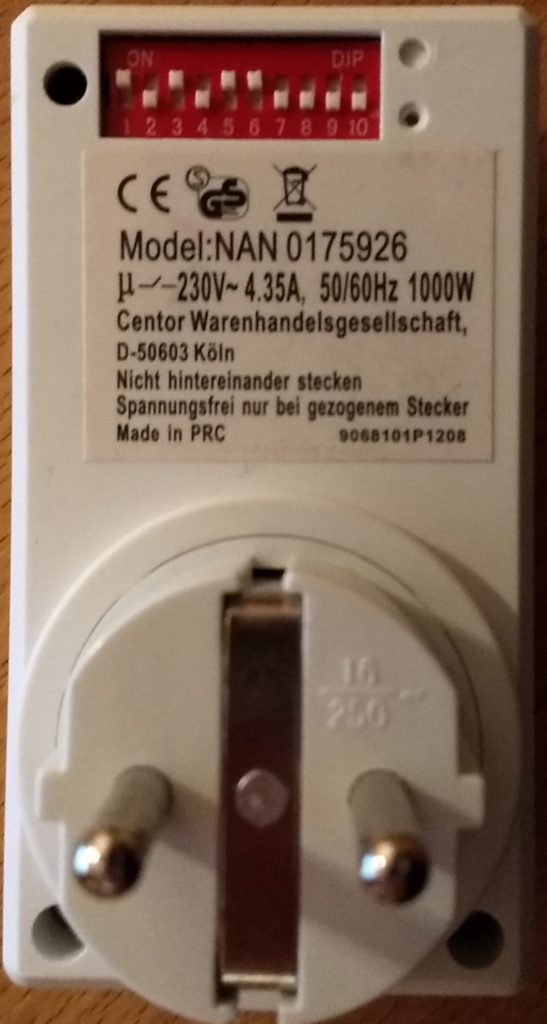
Ich benutze einige dieser billigen Funksteckdosen mit Mäuseklavier (dip-switch) auf der Rückseite. Die will ich natürlich auch mit homeassistant benutzen. Leider braucht die von homeassistant verwendete rpi-rc bibliothek einen Integer als Code. Da ich keinen Konverter finden konnte hier mein quick-n-dirty Konverterscript:
 !/usr/bin/env python3
 import argparse
 def codify(code):
     return code.replace("0", "00").replace("1", "01")
 parser = argparse.ArgumentParser(description='Sends a decimal code via a 433/315MHz GPIO device')
 parser.add_argument('code', metavar='CODE', type=str,
                     help="zeroes and ones from the dip switch ('up'=1, 'down'=0)")
 args = parser.parse_args()
 code= args.code.replace('1','3').replace('0','1').replace('3','0')
 code_off= codify(code+'00')
 code_on= codify(code+'01')
 print("off: {}".format(int(code_off, 2)))
 print("on:  {}".format(int(code_on, 2)))
Ruft man es mit der Einstellung des Mäuseklaviers aus dem Bild als Nullen und Einsen auf:
python dipswitch_convert.py 1010110000
 off: 1115472
 on:  1115473
Bekommt man die Integercodes für an und aus, die man mit Homeassistant oder der rpi-rf Kommandozeile verwenden kann:
rpi-rf_send -g 5 1115472
[:]